
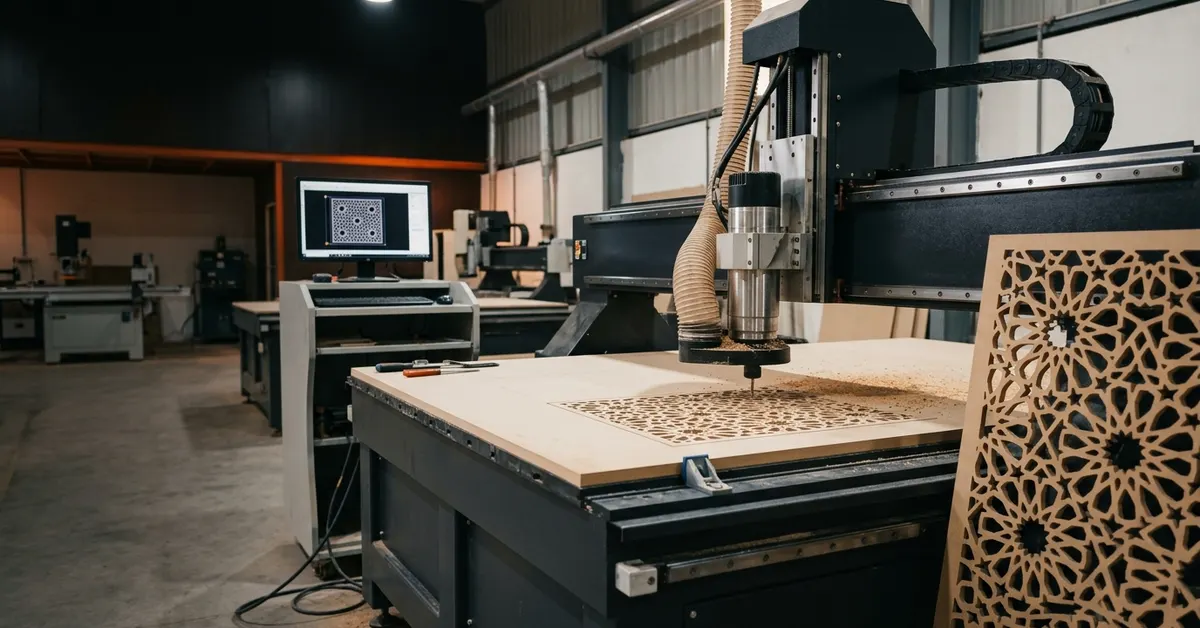
Most people see the finished panel and never the steps behind it. A drawing goes in, a sheet of board goes on the machine, and a few hours later you are holding a perfectly cut jali. It can feel like magic, but it is a very ordered routine, and every step affects the final result. If you are planning a job, knowing the CNC cutting process helps you send better files, ask better questions and avoid delays. Our 2D CNC cutting services team walks clients through these steps every day.
This guide follows a job from the first file to the final delivery. You will see what we check, how the machine is set up, what happens during cutting and how parts are finished at our CNC cutting MDF services in Indore. There is also a table, a few common mistakes and plain answers to the questions people ask before they order.
CNC Cutting Process Explained: From Design File to Finished Product
The CNC cutting process turns a digital vector drawing into a real part through computer controlled steps: design review, CAM programming, material setup, machine cutting, finishing and quality checks. Each stage reduces errors before the next one begins.
The CNC cutting process translates digital vector artwork into physical architectural components through automated, computer controlled manufacturing. CNC stands for computer numerical control. In plain words, a computer tells a machine exactly where to move, how fast to spin and how deep to cut.
The machine never guesses. It follows instructions line by line, so a clean drawing gives a clean cut.
Step 1: Submitting the Design File
The process starts when a client sends a 2D or 3D design in a vector format such as DXF, CDR or Adobe Illustrator to the workshop. Vector files describe shapes as lines and curves, which machines can follow exactly.
Every job begins with a file. Most of our clients are interior designers, architects, fabricators and homeowners, and they usually send a DXF or CDR drawing on WhatsApp. If you only have a sketch or a photo of a pattern you like, our designers can redraw it into a machine ready vector file.
Why vector and not a normal image? A photo or a JPG is made of pixels. A machine cannot follow pixels. A vector file is made of lines, arcs and curves with exact coordinates, and that is what a CNC machine needs. If your design is only available as an image, it has to be traced and cleaned first.
Step 2: Design Review and Feasibility Check
Technical specialists check the drawing for vector continuity, closed geometry, material thickness and bit clearances before anything is cut. This review catches problems that would otherwise damage the sheet or the finished piece.
This is the step most clients never see, and it saves the most money. Before a drawing goes to the machine, a specialist opens it and looks for the usual trouble spots.
- Vector continuity: are the lines unbroken, or are there tiny gaps that would confuse the toolpath?
- Closed geometry: is every shape fully closed, so the software knows what is inside and what is outside?
- Duplicate and overlapping lines: these make the machine cut the same path twice and burn or chip the edge.
- Material thickness: is the board thick enough to hold the thinnest bridge in the pattern?
- Bit diameter clearance: can the cutting tool physically fit inside the smallest slot or inner corner?
That last point surprises people. A round bit cannot cut a sharp inner corner, because the bit has a radius. A slot narrower than the bit simply cannot be cut. We flag these before work starts and suggest small changes so the design stays beautiful and still cuts well.
Step 3: CAM Software and G Code Generation
Once the drawing is approved, it is imported into CAM software, which creates G code. G code is the list of instructions that controls axis movement, spindle speed, feed rate, pass depth and tool changes.
CAM stands for computer aided manufacturing. This software reads the vector drawing and works out how the tool should travel to cut it. The programmer chooses the bit, the spindle speed, the feed rate, how deep each pass goes and in what order the shapes are cut.
The output is G code, a long list of simple commands such as move here, spin at this speed, cut to this depth. The machine controller reads it and drives the axes. A good CAM setup is what separates a smooth, fast cut from a slow, rough one. Inner shapes are usually cut first so the sheet stays rigid, and outer shapes last.
Our CNC laser cutting design guide explains how the same logic applies when the tool is a laser beam and not a spinning bit.
Step 4: Material Preparation and Clamping
Sheets of metal, MDF, wood, HDHMR or acrylic are clamped or vacuum held on the heavy duty machine bed. Firm holding stops vibration and movement during high speed cutting, which protects both accuracy and edge quality.
Before the machine starts, the sheet has to be ready and fixed in place. We check the board for warping, damp patches and thickness variation. Then it is positioned on the bed and held down by clamps, a vacuum table or both.
This step sounds boring, but it matters a great deal. If the sheet shifts even slightly mid cut, the pattern will not line up and the whole panel is wasted. Vibration also causes rough edges and shortens the life of the bit. A well held sheet gives you a clean cut from the first pass to the last.
Different materials need different handling. Soft MDF needs a good vacuum hold. Metal needs rigid clamping. Acrylic needs care so it does not scratch. For board options, see our guide to MDF vs HDHMR.
Step 5: The Cutting Stage
At Eish CNC Designs in Indore, multi axis CNC routers and industrial laser cutters process raw sheets to ±0.1mm accuracy. They cut clean 2D jali, bevels and complex 3D surface carving from the approved toolpath.
Now the machine does its work. The operator loads the G code, sets the starting point on the sheet and runs a quick dry check. Then the spindle starts and the cut begins.
A CNC router removes material with a fast spinning bit that moves along the programmed path. Depending on the job, it can make a flat 2D cut, a bevelled edge or a deep, shaped 3D carving. A laser cutter does the same job with a focused beam instead of a bit, which suits acrylic and thin sheets. Metal is cut on dedicated machines built for it. Our CNC metal cutting services in Indore page covers those options.
Step 6: Dust Extraction and Coolant During Cutting
Automated dust extraction or coolant spray keeps the cut channel clear of chips during machining. That prevents heat build up, thermal distortion and early tool wear, and it keeps the edge clean.
Cutting makes waste, and waste causes trouble. If chips and dust stay in the cut, the bit drags them around, heats up and burns the edge. In wood based boards that leaves dark marks and fuzzy edges. In metal it can warp the part.
So we keep the channel clear while the machine runs. For board materials, a dust extraction shroud pulls chips away at the source. For metals, a coolant spray carries heat and chips off the tool. The result is a cooler cut, a longer bit life and a better edge.
Step 7: Finishing, Deburring and Quality Checks
After cutting, parts are inspected by hand, deburred, smoothed along the edges and measured against the original design. Only checked parts move on to packing and delivery.
A part coming off the machine is not finished yet. We lift it from the bed and look it over carefully. Then comes finishing work.
- Remove tabs, dust and any leftover offcuts from the part.
- Deburr sharp or rough edges, and smooth them where needed.
- Measure key dimensions against the original drawing.
- Check pattern alignment, edge quality and any visible damage.
- Pack the parts safely so they reach you in perfect shape.
Only after those checks do we pack and hand over the job. If a part does not meet the drawing, it is recut.
CNC Cutting Process Stages at a Glance
Here is the whole workflow in one table:
| Stage | What Happens | Who Handles It | Why It Matters |
|---|---|---|---|
| 1. File Submission | Client sends DXF or CDR vector file | Client or in house designer | Machines need exact vector paths |
| 2. Design Review | Check closed shapes, thickness, bit clearance | Technical specialist | Prevents wasted sheets |
| 3. CAM and G Code | Toolpaths, speeds and depths are set | CAM programmer | Controls cut quality and speed |
| 4. Material Setup | Sheet is clamped or vacuum held | Machine operator | Stops movement and vibration |
| 5. Cutting | Router or laser follows the toolpath | Machine operator | Delivers ±0.1mm accuracy |
| 6. Dust or Coolant Control | Chips and heat are removed | Machine system | Protects edge and tool |
| 7. Finishing and Checks | Deburr, smooth, measure, pack | Finishing team | Ensures a ready to install part |
Common Mistakes That Slow Down CNC Cutting
Most delays come from the file, not the machine. Open shapes, duplicate lines, bridges that are too thin and slots narrower than the bit are the most common problems, and all of them can be fixed before cutting.
After many jobs, the same mistakes keep showing up. Fixing them early saves days.
- Sending a JPG or screenshot instead of a vector file.
- Leaving open shapes or tiny gaps in the outlines.
- Stacking duplicate lines on top of each other.
- Designing bridges thinner than the board can safely hold.
- Choosing a pattern with slots narrower than the smallest bit.
- Forgetting to mention the material and thickness up front.
CNC Cutting Process for Different Materials
The same workflow applies to every material, but the machine, bit and speed change. MDF and HDHMR are routed, acrylic is usually laser cut, wood is routed, and metal is cut on dedicated metal machines.
The steps stay the same. What changes is the setup. MDF and HDHMR cut cleanly on a router with dust extraction. HDHMR is denser, so it needs slightly different speeds, and you can read more in our page on HDHMR CNC cutting services in Indore. Acrylic is cut by laser for a polished edge, as covered in our acrylic laser cutting service in Indore.
Solid wood needs care with grain direction, and our CNC on wood page explains how we handle it. If you are after jali patterns specifically, our MDF jali designs page shows what is possible.
How Eish CNC Designs Runs the CNC Cutting Process in Indore
Eish CNC Designs, at Gurunanak Timber Market on Dhar Road in Indore, offers client supplied job work as well as complete material supply with cutting. Files can be sent directly on WhatsApp for a quick review.
We serve architects, interior decorators, industrial fabricators and homeowners across Madhya Pradesh. There are two simple ways to work with us. Under job work, you bring your own sheets and we cut them. Under the complete service, we supply the material, cut it and deliver finished parts.
Either way, the first step is easy. Send your vector file on WhatsApp and talk to the team directly. We check the drawing, confirm the material and thickness, and share a clear quote. From there, your file moves through the same steps described above and comes out as ready to install decorative jali grilles, building facades, custom kitchen components or tailored interior furnishings.
Wondering what it will cost? Our CNC cutting price in Indore guide explains the main cost factors in plain language.
Conclusion
So, what does the CNC cutting process really come down to? A good file, a careful review, smart programming, a firmly held sheet, a clean cut and honest quality checks. Each step protects the next, and skipping any of them is where jobs go wrong. If you understand these steps, you can brief your supplier better, avoid delays and get panels that fit on the first try.
Ready to turn your design into a finished product? Send your file on WhatsApp and we will review it and quote within 24 hours. Contact Eish CNC Designs and let's get your project moving.
Frequently Asked Questions
-
What is the CNC cutting process?
The CNC cutting process turns a digital vector design into a physical part using a computer controlled machine. A design file is checked, converted into G code through CAM software, the material is clamped on the machine bed, the cut is run, and the finished parts are inspected, cleaned and delivered.
-
Which file formats are used for CNC cutting?
Vector files work best. The most common formats are DXF, CDR and Adobe Illustrator files. The drawing should have closed shapes, continuous lines and no overlapping or duplicate paths, so the software can read it and create clean toolpaths.
-
What is G code in CNC cutting?
G code is the set of instructions a CNC machine follows. It tells the machine where to move on each axis, how fast to spin the spindle, how quickly to feed the tool, how deep each pass should go and when to change tools. CAM software generates it from the design file.
-
How long does CNC cutting take?
Time depends on the material, thickness, design detail and number of pieces. A simple 2D panel can be cut in under an hour of machine time, while detailed jali or 3D carving takes longer. Design checks and finishing add to the total, so ask for a time estimate with your quote.
-
What materials can be cut with the CNC cutting process?
CNC routers cut MDF, HDHMR, plywood, solid wood and some plastics. Laser machines cut acrylic and thin sheet materials, and metal cutting machines handle steel and other metals. The right machine depends on the material and the finish you need.
-
How do I start a CNC cutting project with Eish CNC Designs?
Send your vector file in DXF or CDR format on WhatsApp. The team checks the drawing, confirms the material and thickness, and shares a clear quote. You can choose job work with your own sheets, or a complete service where Eish CNC Designs supplies the material and cuts it.